Technology Infrastructure for Barndominium Builders
Plan technology infrastructure for your barndominium project. Covers connectivity, cloud vs on-prem, CRMs, security, and budgeting for rural builds.
You're standing on a rural lot with a stack of plans on your truck seat, one barndominium drawing in your hand, and one nagging question in your head, how is this place going to work day to day? The answer splits in two fast. There's the connectivity stack that has to serve the finished home, and there's the operational stack that has to keep your builder, subs, invoices, drawings, and inspection dates from turning into chaos.
Get either half wrong and you pay for it twice. You'll chase change orders, lose time on revisions, miss inspection windows, and end up in a finished home that looks right but can't reliably support remote work, cameras, or smart controls. A lot of buyers think technology infrastructure is a move-in issue. On rural ground, it's a pre-construction decision, the same way septic, power, and driveway access are.
Table of Contents
- Why Technology Infrastructure Matters on a Barndominium Project
- The Four Layers of Technology Infrastructure Explained
- How Capital-Intensive Infrastructure Changes the Planning Mindset
- Cloud vs On-Premises vs Hybrid for Builders and Owner-Builders
- Connectivity on Rural Barndominium Sites
- The Operational Stack That Runs a Barndominium Project
- The Bottleneck Is Not Always Last Mile
- A Practical Checklist and Budget for Your Build
Why Technology Infrastructure Matters on a Barndominium Project
A buyer calls me, says they've found ten acres, the price is right, and the barndominium layout is almost locked. Then they drive the parcel and realize there's no fiber at the road, no clear answer on fixed wireless, and the cell bars come and go depending on where you stand. That's the moment the project stops being about square footage and starts being about whether the place can run.
Technology infrastructure matters because a barndominium is both a house and a jobsite. The home needs reliable connectivity for work, security, and everyday life, while the project team needs software, document control, and communication tools that don't fall apart when you add a second crew or a new revision set. The World Bank's data makes the bigger point clear, digital scale keeps growing, with data creation rising from 2 zettabytes in 2010 to an expected 120 zettabytes in 2023, and forecast to exceed 180 zettabytes by 2025. The same source says connected data centers grew by 72% during 2018 to 2022, while low- and middle-income countries held only about one quarter of the nearly 5,000 connected data centers in 2022, which shows how much of modern life depends on physical compute and storage, not just a radio signal. World Bank report on digital infrastructure scale
That matters to you because rural sites don't forgive lazy planning. If you wait until trim-out to think about conduit, you'll pay for it in ugly workarounds. If you wait until move-in to think about software, your builder will already have lost the trail on selections, invoices, and warranty items.
Practical rule: If the parcel can't support a reliable connection plan on paper, don't pretend it'll be fine in the field. Fix the infrastructure question before you sign the building contract.
The best barndominium projects treat technology the same way they treat plumbing. You don't run a finished house and hope water finds the faucet. You design the path first, then build around it.
The Four Layers of Technology Infrastructure Explained
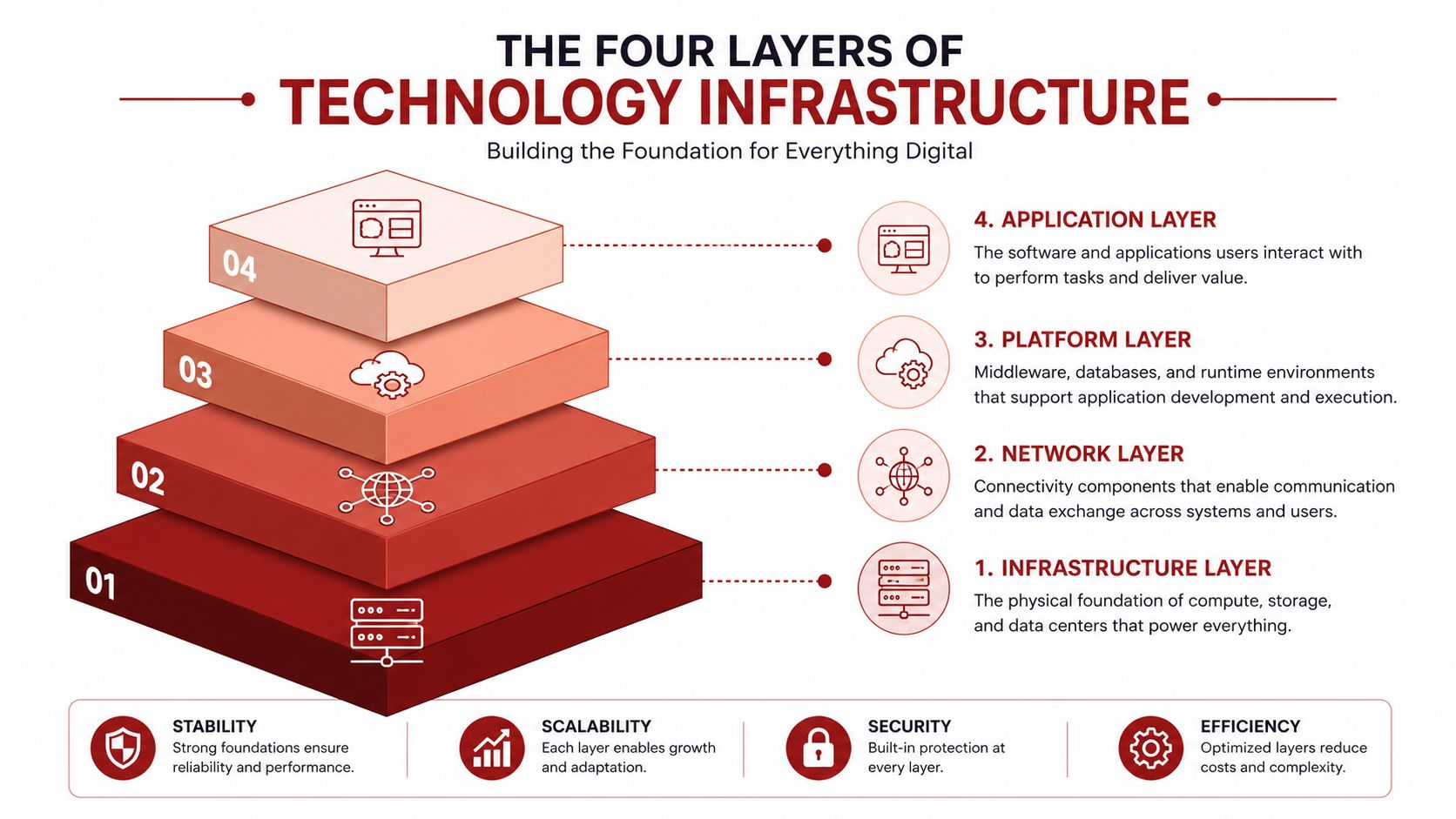
Think of technology infrastructure as a stack, not a shopping list. If the bottom layer is weak, the layers above it wobble. A barndominium project works the same way, because every app, camera, remote login, and file share depends on what's underneath.
Connectivity
Connectivity is the road in and out. On a barndominium site, that can mean fiber at the road, fixed wireless from a local provider, LTE or 5G home internet, or satellite when nothing else is dependable. In the field, I think of this as the driveway and culvert for data, if it's narrow or unreliable, every truck behind it backs up.
Compute
Compute is the hardware that does the work. For a homeowner, that might be a router, a network switch, a mesh access point, a laptop, a tablet, and a small cabinet in the utility room. For the builder, it can also include a local server or a workstation used for estimating, takeoffs, and plan review. Without enough compute, even a good connection feels slow because the device itself becomes the bottleneck.
Software
Software is where the project gets organized. That includes the CRM that tracks inquiries, the project management app that assigns tasks, the accounting system that handles invoices, and the document hub where plans and permits live. A clean software layer keeps the job from turning into a text-message archaeology project.
Security
Security is identity, access, and recovery. It covers passwords, multi-factor authentication, role-based access, and backups of drawings, photos, and accounting records. If a storm knocks out hardware or somebody deletes the wrong folder, security is what keeps one mistake from becoming a full reset.
The cause-and-effect is simple. Connectivity feeds compute, compute runs software, and security protects all of it. A planner who starts with the bottom of the pyramid makes better decisions about the rest.
Builder's shortcut: Buy from the bottom up. Confirm the connection first, then size the equipment, then choose the software, then lock down recovery.
How Capital-Intensive Infrastructure Changes the Planning Mindset
Infrastructure takes time and money because the hard parts aren't optional. UNCTAD reports that global greenfield investment announcements in ICT infrastructure reached $14.9 billion in 2024, which was less than 25% of the estimated $62 billion annually needed to meet infrastructure goals. GSMA estimates total mobile infrastructure investment at $462 billion per year on average between 2019 and 2023, which tells you where spending goes, towers, backhaul, and access networks, not just the customer-facing headline service. UNCTAD on ICT infrastructure investment
What that means on your parcel
Once you see infrastructure as capital-intensive, you stop thinking in weekends and start thinking in years. Trenching conduit, running fiber to an outbuilding, placing a network cabinet, or choosing a provider are not cosmetic choices. They're more like foundation decisions, hard to change once the slab is down and the walls are up.
That's also why I tell owners not to treat technology like a finishing touch. Paint can wait. Network paths can't. A missed conduit run in a rural build usually means cutting drywall later, hiring extra labor, and compromising the finish just to solve a problem that should have been designed in from day one.
Use a plumbing mindset
If plumbing leaks, nobody says, “We'll patch it after move-in and call it good.” They fix the route, the fittings, and the access. Technology infrastructure deserves the same discipline.
If you're financing the build, keep the technology plan inside the broader cash plan, not as an afterthought you “figure out later.” The loan structure matters because every delay in infrastructure choices can cascade into schedule drift, and schedule drift is expensive. A practical place to start is this construction-loan resource, which helps frame the financing side alongside the build sequence: construction loan planning for barndominium projects.
The right mindset is blunt, if you expect to redo the connection stack later, you're already budgeting twice.
Cloud vs On-Premises vs Hybrid for Builders and Owner-Builders
For the back office, the question isn't which buzzword sounds modern. It's which setup keeps the job moving without handing you a second career in IT. Most barndominium builders do not need a server room. They need a system that works on a jobsite, in a truck, and from a kitchen table.
Cloud
Cloud tools live online, so your estimates, drawings, messages, and invoices are accessible anywhere you have a good connection. That's the cleanest fit for most owner-builders and small firms because it lowers maintenance and keeps the team on the same version of the truth. If a client calls while you're on the parcel, you can pull the file without VPN drama or waiting for a local machine to sync.
On-premises
On-premises means the software and files live on hardware you control. That gives you tighter control over data and local access, but it also means you own the backups, updates, and hardware failures. For a small builder, on-premises usually makes sense only when there's a specific reason to isolate sensitive data or maintain strict local control.
Hybrid
Hybrid combines the two. You keep the everyday workflow in the cloud, but you retain a local layer for files, backups, or specialty work that benefits from direct control. For a builder running several crews or handling a heavier file load, hybrid can be the sweet spot, but it's more demanding to manage well.
Cloud vs On-Premises vs Hybrid at a Glance
| Model | Best For | Upfront Cost | Ongoing Cost | Control | Skill Required |
|---|---|---|---|---|---|
| Cloud | Most small builders and owner-builders | Low | Predictable subscription spend | Moderate | Low to moderate |
| On-Premises | Special cases with strict local control | Higher | Hardware, maintenance, backups | High | High |
| Hybrid | Builders with multiple crews or mixed needs | Moderate | Mixed software and hardware cost | High | Moderate to high |
Here's the rule I use. Cloud for almost every barndominium builder under 50 active projects, hybrid once the operation needs local file control and more crew coordination, and on-premises only when there's a real operational reason, not because somebody likes owning the box.
Connectivity on Rural Barndominium Sites
A rural parcel can be technically “served” and still be a headache. That's because the service that looks good on a coverage map may not hold up when you add video calls, cameras, uploads, and multiple users. The APEC telecom study and the Global Solutions Initiative both point to the layered reality, coverage isn't the whole story, and usability depends on more than a signal bar. APEC telecom study on underserved broadband
What the main options really do
Fiber is still the gold standard where it exists. It's the most dependable fit for plan uploads, video meetings, cloud backups, and a smart home that stays online.
Fixed wireless from a local WISP can be solid if you have line of sight to a tower and the provider's upstream is healthy. It's a practical middle-ground when fiber hasn't reached the road yet.
LTE and 5G home internet can work well in pockets with strong carrier coverage. The catch is that performance can swing with congestion, signal quality, and location on the parcel.
Satellite, especially LEO options, gives you reach where the other choices fail. It's useful for remote land, but latency and service behavior still matter if you're heavy on video calls or live monitoring.
What to check before you sign
- Line of Sight: Ask whether the site can see the relevant tower or relay without tree interference.
- Conduit Access: Verify whether conduit already runs from the road, or whether you're paying for trenching later.
- Utility Reality: Confirm what the local utility will deliver, not what the county map suggests.
- Outbuilding Reach: Plan for point-to-point links if you want internet in a shop, barn, or detached office.
- Workload Fit: Match the service to the actual use, not the marketing pitch.
If you're evaluating land, tie the site-prep conversation to the build plan early. This resource is a useful starting point for the ground-level checklist: site prep guidance for barndominium lots.
A good connection plan doesn't just cover the house. It covers the shop, the gate camera, the office, and the fact that somebody will try to stream a meeting while someone else uploads drawings.
The Operational Stack That Runs a Barndominium Project
The project stack is where a lot of small builders get sloppy. They buy a CRM, then a scheduling app, then a document tool, then a separate accounting package, and none of it talks to the others. That's how you end up with three versions of the same address and a warranty issue buried in someone's text messages.
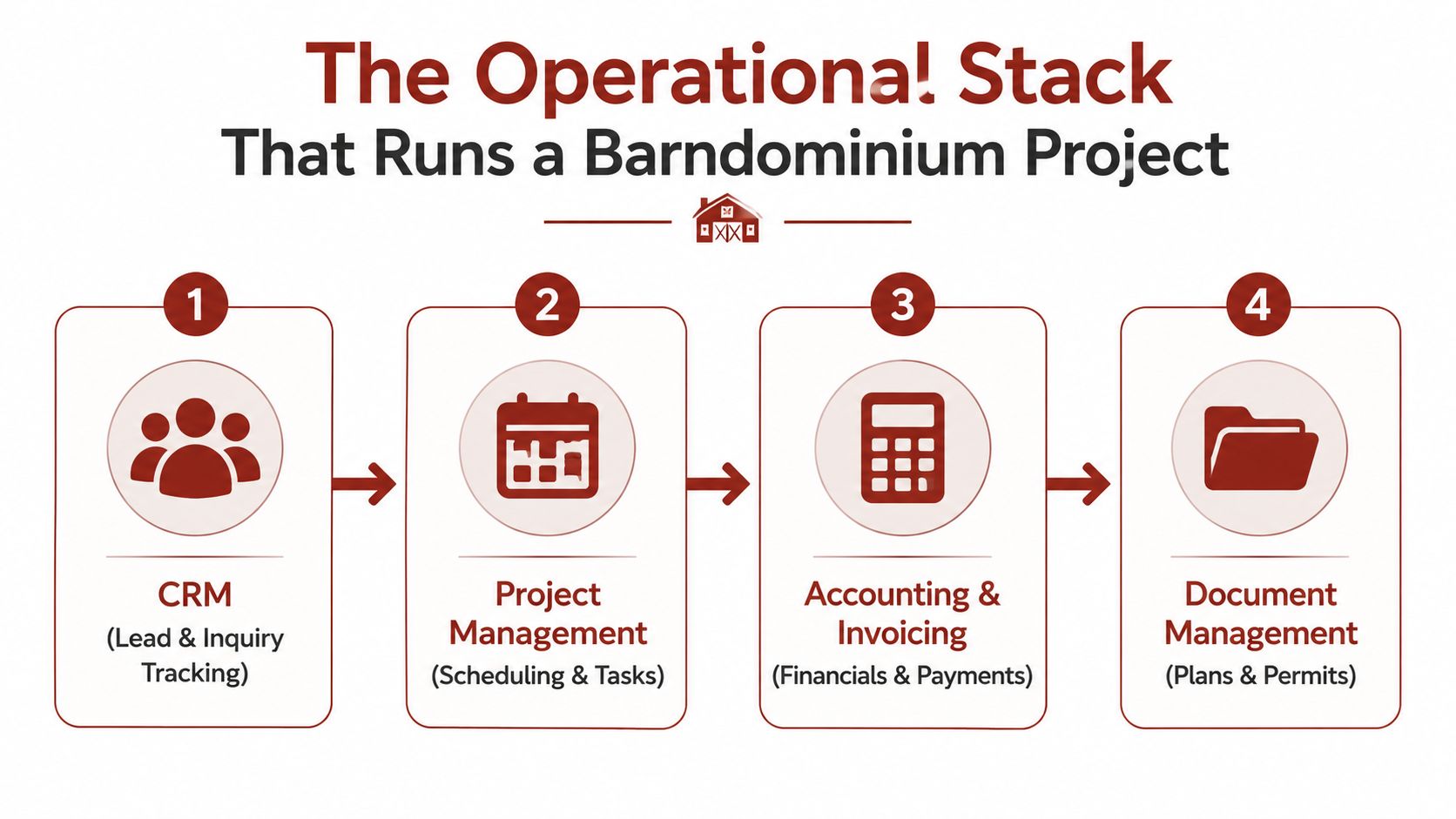
CRM and inquiry tracking
The CRM is the front door. It catches the lead, the phone number, the lot address, the scope, and the first set of notes. If it's done well, every later decision can trace back to one clean record instead of a string of forwarded emails.
Project management and scheduling
Scheduling turns interest into execution. It assigns owners, dates, dependencies, and reminders so the slab crew, framing crew, and inspector aren't guessing at the same time. A good system keeps the job moving even when the field team is busy and the owner is asking questions.
Accounting and invoicing
Accounting is where reality shows up. It tracks deposits, draws, change orders, vendor bills, and payment status, which keeps the project from drifting into cash-flow confusion. If this layer isn't connected to the schedule and scope, you'll miss what's been billed and what still needs approval.
Document management
Plans, permits, revisions, selections, and warranty records belong in one controlled place. The folder structure matters less than discipline, because the team needs the current revision, not a file called “final_final2.pdf.” If your document system can't tell the difference between the latest set and the old one, it's already failing.
The best setup is a connected flow from inquiry to warranty. Each layer feeds the next, and nobody has to retype the same data five times.
Operational rule: If a tool doesn't reduce re-entry, it's probably adding drag.
The Bottleneck Is Not Always Last Mile
A lot of buyers blame the internet provider nearest the property line, but that's often the wrong target. The weak point is frequently the middle mile, the transport between the local network and the wider internet, plus the parts that glossy coverage maps skip over, affordability, governance, and actual usage. That gap turns a “served” address into a frustrating daily experience.
The practical move is to ask sharper questions. Is this company a true last-mile provider, or are they reselling someone else's transport? What upstream paths do they have? What happens if one transport route goes down? Can they explain redundancy without reading from a brochure?
If you're talking to a WISP or fiber provider, ask about:
- Backhaul ownership: Do they control their own upstream transport, or lease it?
- Redundancy: What happens when the primary path fails?
- Oversubscription: How do they handle peak demand when multiple users hit the network at once?
- Service model: Are they a direct provider or a reseller with limited control?
The failure patterns show up fast. If nobody can explain the upstream path, if there's only one way out of the system, or if every performance question gets the answer “it depends,” the plan is fragile. That kind of setup might work for light browsing, but it will age badly once the house, cameras, and remote work all start competing for bandwidth.
The fix is better transport, better local economics, and a provider who can stand behind the whole path, not just the last mile.
A Practical Checklist and Budget for Your Build
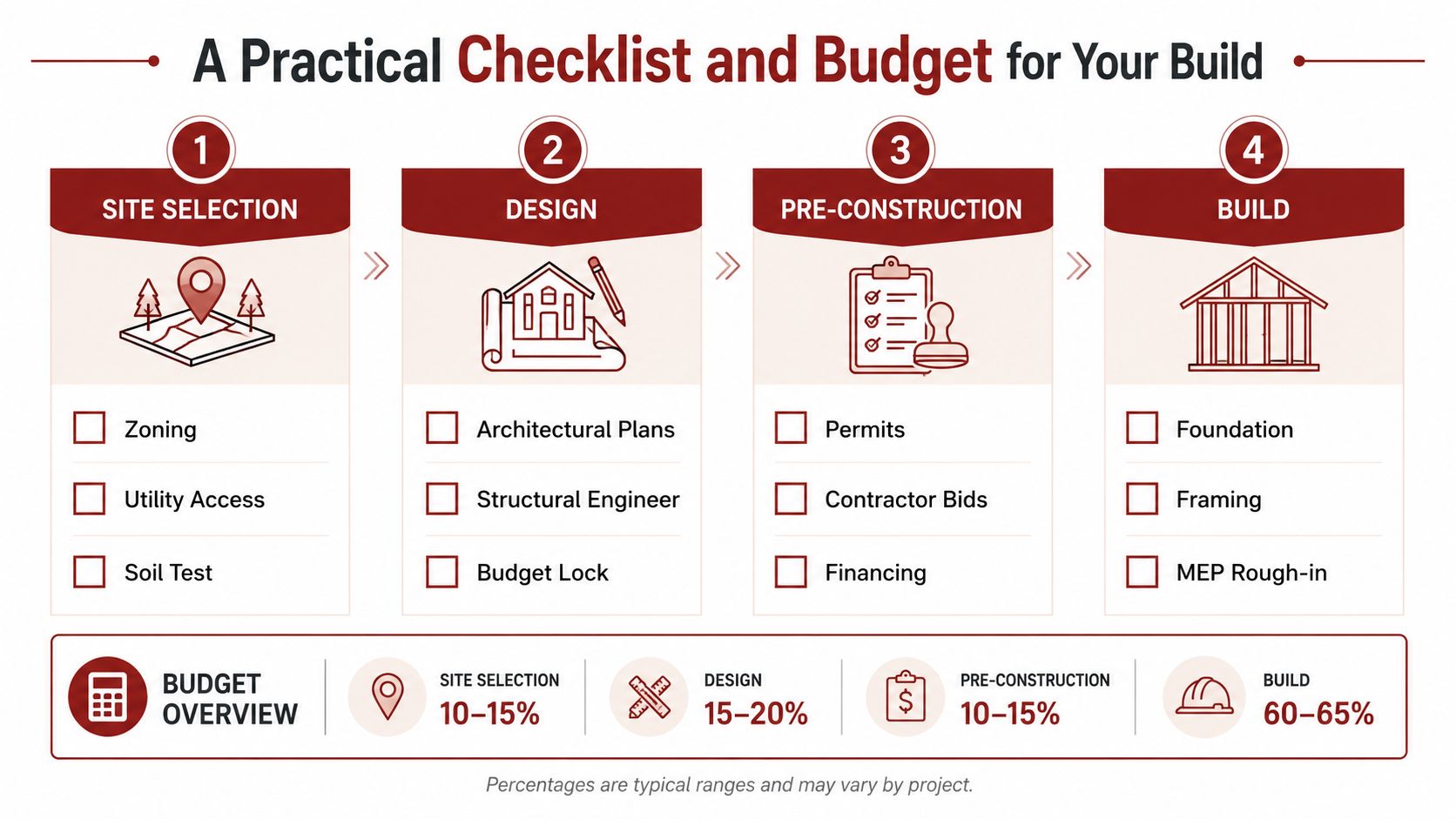
A good technology plan gets easier when you break it into phases. During site selection, confirm zoning, utility access, and soil conditions because those choices affect trenching, conduit, and where equipment can realistically sit. During design, lock the architectural plans, structural coordination, and budget so network paths and equipment closets don't get squeezed out later.
By pre-construction, the list needs to be concrete. Get permits, contractor bids, and financing lined up, then decide where the connection enters the home, where the network cabinet lives, and how the shop or outbuilding will tie in. During the build, protect the rough-in work for foundation, framing, and MEP so low-voltage, conduit, and access points don't get treated like afterthoughts.
A simple budget mindset helps. Put money aside for connectivity, on-site networking, software subscriptions, and a basic security and backup setup. Don't overbuy gear because a salesman said you might need it someday, but don't cut the foundation-level items either, because those are the pieces that are painful to retrofit.
For cost planning, keep the broader build budget in view and tie the technology line items to the whole project instead of treating them as random extras. This cost resource is useful when you're deciding what belongs in the construction budget versus what belongs in the move-in phase: barndominium cost planning guide.
The single biggest mistake is waiting until the slab is poured to decide how the home and project team will connect. At that point, every retrofit gets harder, uglier, and more expensive. Decide the technology infrastructure plan first, and the rest of the build gets cleaner.
If you want a cleaner way to shortlist builders and keep the tech side of your barndominium project grounded in reality, visit BarndoBuilderList. It's built for buyers who want a more disciplined starting point, especially when rural connectivity, project coordination, and builder fit all matter at once. Use it to narrow your search before you commit to land, drawings, or a contract.
- technology infrastructure
- barndominium builders
- rural connectivity
- construction CRM
- IT planning